TL;DR
- Vit is a DaVinci Resolve plugin that gives video teams branching, merge, and version history over their project files.
- It's built for small production teams, student film crews, and hobbyist filmmakers, the people who collaborate on video without an IT department behind them.
- We built it and shipped in March 2026. The launch video hit 2 million views on X and brought in over 10,000 users.
- The decision that mattered most was subtractive: we deleted the terminal and kept the vocabulary.

1.The goal
Video post-production runs as a relay: the clip editor hands off to sound, sound hands off to colour, and colour hands off to VFX. Each person waits for the person before them, and every handoff is a file that gets renamed, duplicated, emailed, or lost.
The dashed boxes mark where a team loses time: each role after the first can't start until a file arrives, and that file is the only record of what state the video is in.
We wanted a team to stop waiting on each other: open the project, see what state the video is in, know whether it's safe to start working, and get to work. That meant no messaging someone to ask which version is current and no guessing whether the file in the shared drive has the new grade.
The goal was to give editors back the hours they spend on file archaeology, so those hours go into editing instead of into version control.
2.What we found talking to editors
We talked to people on small production teams, in high school film programs, and among hobbyist filmmakers working out of their bedrooms. Their budgets and skill levels differed, and the problem was the same. Three patterns came up in almost every conversation:
- Nobody knew what state the project was in. The question that mattered was the small, constant one: has sound already touched this, or am I about to overwrite their work? The answer lived in someone's head or in a Discord message from four days ago.
- The workaround was duplication. Every team had a folder full of near-identical project files, named in a way that encoded a history only the person who made them could read, and that works until two people do it at once.
- Nobody worked in parallel because parallel work was unsafe. Teams serialized on purpose, since waiting for your turn was less painful than merging two versions by hand.
The third pattern reframed the problem for us, because the bottleneck was the tools making parallel work dangerous enough that teams gave it up voluntarily, rather than the speed of the handoffs.
3.The problem, stated precisely
The problem is that there is no shared source of truth for a video project, so teams serialize their work to stay safe, and they pay for that safety in idle time and lost files. Three needs follow from that:
- Anyone on the team can see the current state and history without asking a person.
- Two people can work at the same time without one of them losing a day.
- When their work collides, resolving it takes seconds and doesn't require understanding how the tool stores anything.
4.Why Git, and where the metaphor breaks
Software teams solved this problem twenty years ago. Branching, merging, and history tracking are the exact shape of what video teams were missing, and we weren't going to invent a new model when a proven one existed.
What we took: the mental model
We kept three ideas: a branch is a safe place to work, history means you can go back, and merging turns two people's work into one thing. Those ideas carry all the value.
Editing, sound and colour each branch from the same rough cut and work at the same time, then come back together in a merge instead of passing one file down the line.
What we changed: the merge itself
Git performs a textual merge, comparing files line by line, which works for source code and means nothing for a Resolve timeline, where the file is binary and the meaningful unit is a clip, a track, or a colour node. Vit does a structural merge instead, comparing the project's metadata rather than its bytes. It's the same move AST-based merge tools make to resolve conflicts Git gives up on, applied one level over.
What we threw out: the interface
Git's power comes wrapped in a command line and about forty terms you have to hold in your head. We kept the words and removed the need to remember them.
At a terminal, you recall the right command in the right order with the right syntax, at a blank prompt that tells you nothing. A button labelled Commit teaches the word by showing where it lives. An editor who has never typed a Git command can still read Create, Switch, Merge, Push and Pull on a panel and guess what each one does.
Our users already had a tool they were good at. Vit had to live inside it.
5.What we cut
We wanted to build a GitHub layer underneath, with hosted repositories, file storage, and the whole remote side, and we cut it.
Video files are enormous, and storage is a different business from the one we were in. The problem we'd validated was coordination inside a team that already shares files somehow, rather than the sharing itself, and building storage would have taken most of our time to solve a problem nobody in our interviews had raised.
So push and pull point at an ordinary GitHub repo the team makes themselves. Vit versions timeline metadata, which is a few kilobytes. The footage keeps moving the way it already did, on a drive or in Dropbox, and a manifest records paths and checksums so Resolve can relink.
We own the coordination layer and stay out of the storage layer. That boundary is why a two-person team can start using Vit without signing up for anything, and why there was no infrastructure to pay for when 10,000 people showed up.
6.Designing it
Our first drafts put everything in a terminal. Vit had its own command set, each one mapping to a Git equivalent, and the user would type vit branch the way a developer types git branch.
We scrapped it as the main interface, and the reason traces back to section 1: we'd said the tool shouldn't cost the user time to learn, and a command set is a thing you have to learn before it does anything for you. It also put a terminal in front of someone whose entire workflow is visual, so every command was a small message that the tool wasn't built for them.
What replaced it was a panel of large buttons inside Resolve: Create, Switch, Merge, Push, Pull, Status and Commit. Same operations as the terminal, same words, nothing to type. Under the buttons sit a running log of what Vit just did and a history graph of every saved version.
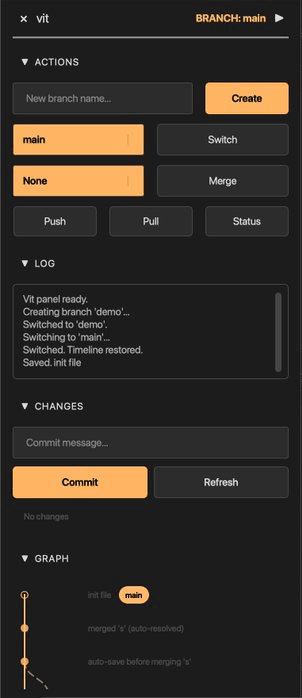
The Vit panel as it launched, docked inside DaVinci Resolve. Branch actions at the top, the log in the middle, then changes to commit and the history graph.
The product is called Vit and pitched as Git for video editing, so the buttons use the words the pitch uses.
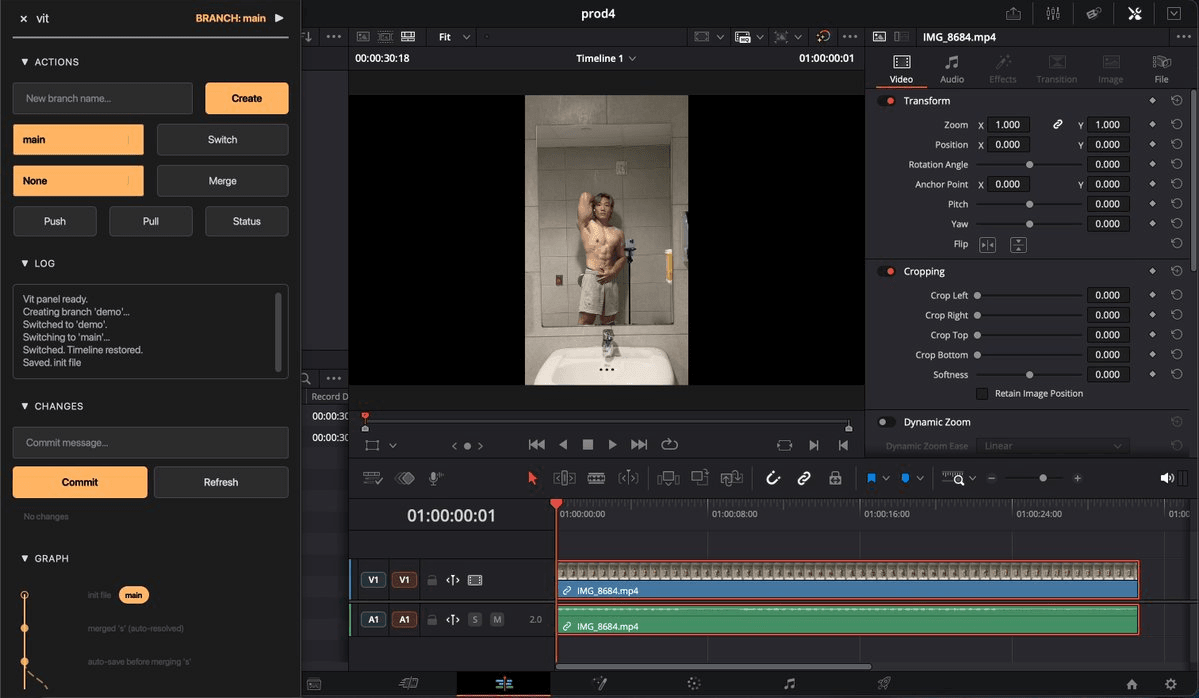
The launch panel in context, docked at the left of DaVinci Resolve with the timeline it versions beside it.
We did design the other version. Under the project's original name, Giteo, we worked out a panel that translated every Git word into something an editor already says. Branches became Workstreams, named for the roles on a post-production team: Video Edit, Sound Design, Color Grade. Commit became Save Version. Merge became Combine Workstreams. A role selector at the top meant nobody picked a branch off a list, and a single line under the merge button said which teammate you were waiting on.
| Git | What launched | The Giteo design |
|---|---|---|
| branch | Create, Switch | Workstream |
| commit | Commit | Save Version |
| merge | Merge | Combine Workstreams |
| diff | Changes list | View Changes |
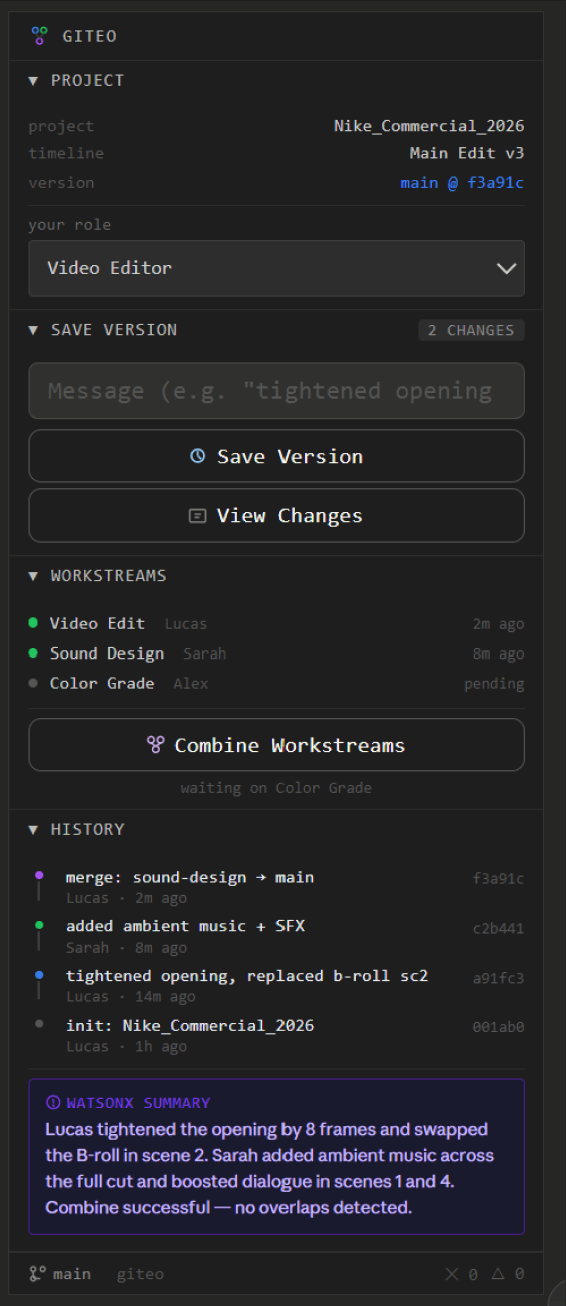
The Giteo design, before the rename to Vit. This was not the launch UI. The summary box reads WATSONX because the design targeted the IBM prize track; the shipped Vit uses Gemini 2.5 Flash.
The branch graph
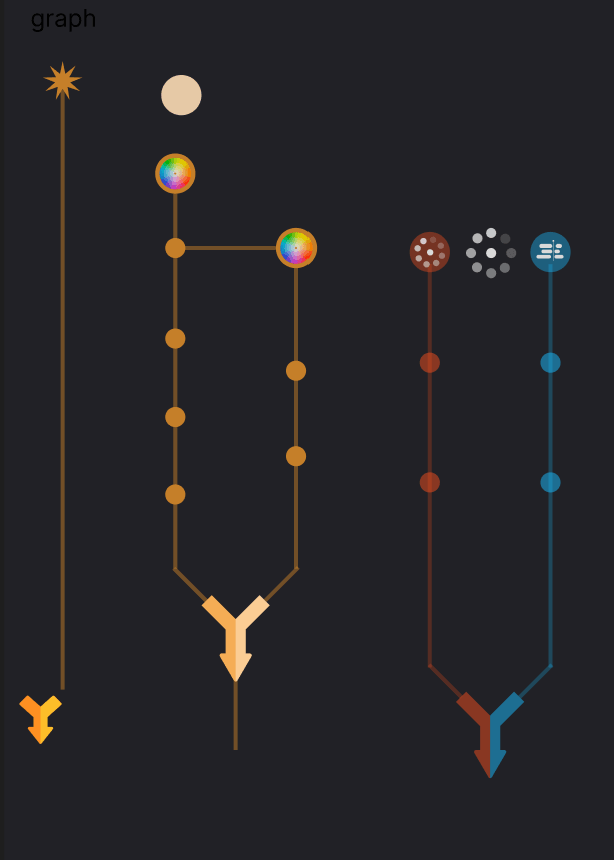
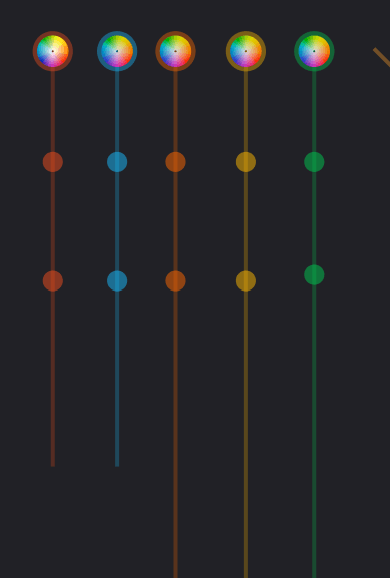
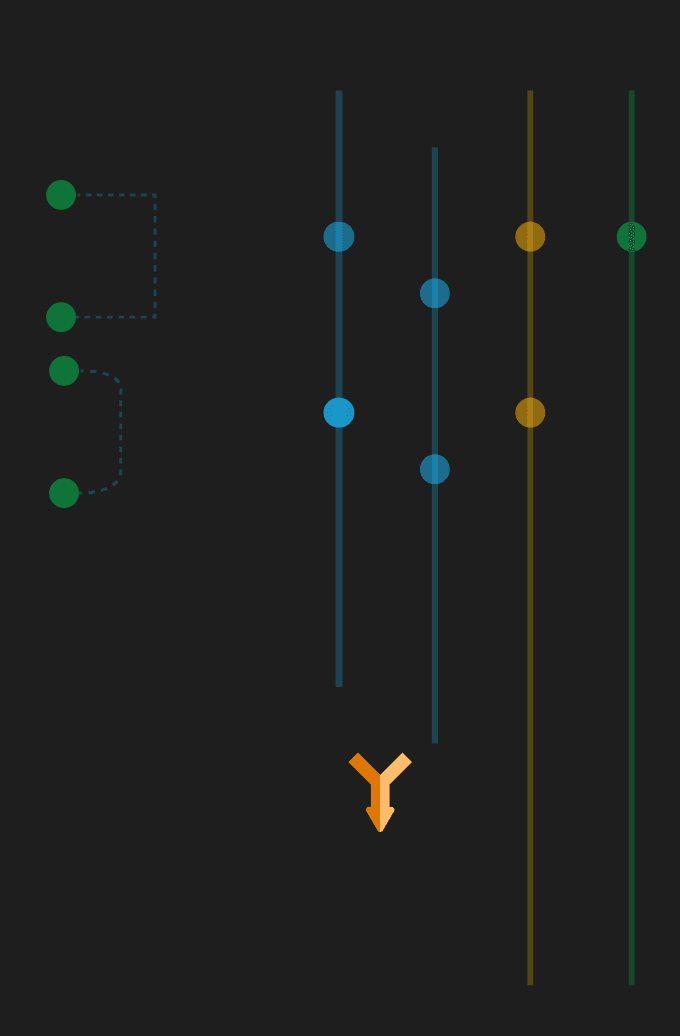
A developer reads a Git graph fluently. An editor has probably never seen one. Four explorations came before the shipped version.
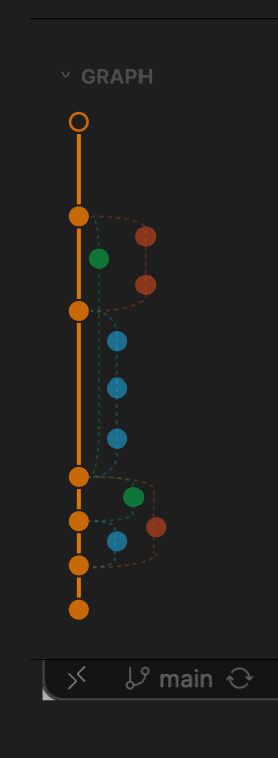
Exploration: a trunk with colour-coded branches.
Exploration: several branch structures converging through merge arrows.
Exploration: node treatments, one colour per branch.
Exploration: branches as parallel tracks joined by a merge arrow.
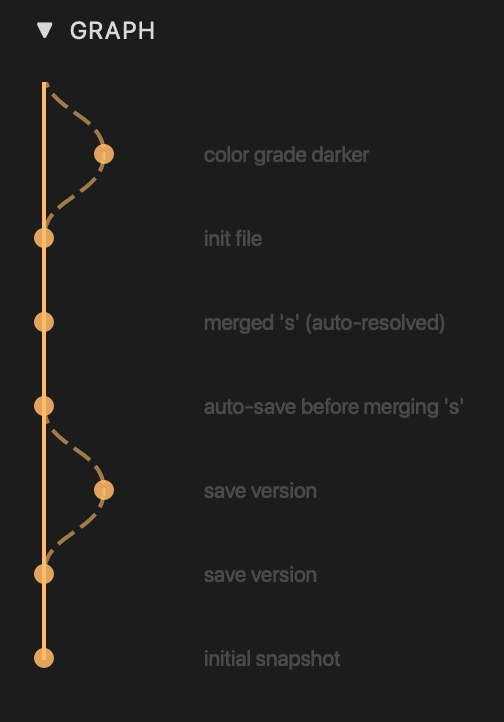
The history graph that shipped. Main runs as a solid trunk and each branch leaves and rejoins it as a dashed curve. Two labels show the merge safeguards: "auto-save before merging" is a version Vit saves on its own before every merge, so a clean state exists from just before each one, and "merged (auto-resolved)" is a merge that needed no decision from anyone.
7.The hardest screen: merge conflicts
This is where the principles above had to become a screen, and the best thing we built for it is the part that never runs. The obvious implementation writes one timeline.json and versions that, which means every collaborator edits the same file, every parallel edit collides, and you spend the project resolving conflicts your own file layout created.
So we split the timeline into six files along the lines the team already divides along: cuts.json for the editor, color.json for the colorist, audio.json for sound, and separate files for effects, markers, and project metadata.
Now the colorist and the sound designer can work on the same timeline at the same time with no conflict to resolve, because they aren't touching the same file. Git merges three disjoint changesets without being asked to make a single judgment call, since the file layout does the work an algorithm would otherwise have to do. This applies the insight from section 2 to storage instead of scheduling: teams divide by role, so the data should too.
The launch demo shows it happening. On one branch, the colour grade goes darker. On main, the clip gets cut in two. Then the log reads "Merging 'final_demo' into 'main'..." and, one line later, "Merged 'final_demo'." A colour change and a cut, made on separate branches, came back together without a single question to the user, because one lives in color.json and the other in cuts.json.
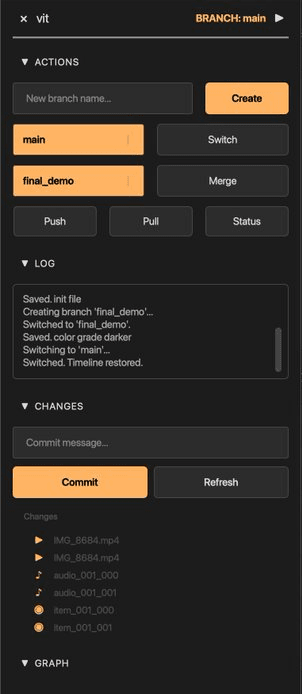
The launch demo one click before the merge. The log shows the darker grade saved on final_demo, then the switch back to main, and final_demo is already queued in the Merge field.
What's left is the residue, and it's nastier than a normal conflict: cases where Git merges cleanly and produces a broken timeline. If the editor deletes a clip the colorist graded, both files merge fine and the grade points at nothing, and if the editor trims a shot while sound mixes for the old length, the audio no longer matches. In both cases the files are different, there's no textual conflict, and the timeline is silently wrong.
A rule-based validator catches those after every merge. Detection is deterministic, which matters because this layer decides whether anything is wrong at all, and an LLM sees the problem only once the validator has found something, along with the base, ours, and theirs versions and the specific issues named.
We limited how far we trusted the model in two ways: it never writes without the user approving what it changed, and the panel works completely without an API key, because AI in the GUI is enrichment and never a dependency. To be precise, these are instructions in a prompt and not a trained model, so the same conflict can resolve differently twice and you can't unit test a prompt the way you can test a merge algorithm. That's acceptable for cases that are rare, reviewed, and reversible, and it isn't acceptable for anything running unattended on client work.
The hard part is that the user has a few seconds of patience and a decision they can't verify. Video isn't text, so you can't read a diff, and genuinely checking the recommendation would mean scrubbing both timelines side by side, which is the work Vit exists to eliminate. Asking the user to verify hands the problem back, and not asking means trusting a machine with someone's afternoon.
So the design question was less about computing the right answer than about how much to ask the user to take on faith, and what to show so that taking it on faith feels reasonable. The Giteo design answered that with a summary written about the edit instead of the files:
Lucas tightened the opening by 8 frames and swapped the B-roll in scene 2. Sarah added ambient music across the full cut and boosted dialogue in scenes 1 and 4. Combine successful, no overlaps detected.
The summary box from the Giteo design, cropped. Two sentences about the edit and a verdict, with no filenames or diff. This design did not ship as-is; the box reads WATSONX because it targeted the IBM prize track, and the shipped Vit uses Gemini 2.5 Flash.
The summary has no filenames, metadata, or diff, only two sentences about what your teammates did in the language you'd use yourself, followed by a verdict. This framing answers the trust problem: a user can't check a metadata comparison, but they can check "Sarah boosted dialogue in scenes 1 and 4" against what they expected Sarah to be working on. It moves verification from something only the tool can do to something the user can do in three seconds without opening a timeline.
The last clause covers the other half: "No overlaps detected" reports which validation check ran and passed, in four words, without teaching anyone what a merge rule is.
The launch build does a smaller version of the same thing. Merging in the panel shows a diff summary, plus an AI recommendation for how to combine the branches when an API key is set. From the terminal, vit log --summary turns recent history into a plain-language overview for the team.
8.Constraints
Two constraints changed what the user got.
A plugin API we didn't control
Vit lives inside DaVinci Resolve's scripting environment, which sets the boundary on what the panel can do and how it can look. The panel ships in Tkinter, with an optional Qt build for anyone who installs it, because Tkinter is what we could count on being present in Resolve's Python without asking users to install anything first. The constraint was ugly and still the right call, since a tool that needs a dependency install before it opens is one most people never open.
The API also limits what Vit can see: colour is write-only, so a grade can't be read back, and retiming reads as constant speed only, so ramps are invisible. Calling SetName() on an existing timeline duplicates every clip in it, so restoring a version uses a three-phase create, populate, rename flow instead of the obvious one, which is a failure you only find by shipping it and watching someone's timeline double.
Everything Vit does passes through the panel: it reads the timeline through Resolve's scripting API, writes restored versions back into the project, and syncs with the team's repo, so only timeline metadata ever leaves Resolve.
A split development environment
I was on Windows while the rest of the team was on Mac, which surfaced hardcoded Mac paths and symlink permission errors that a Mac-only team would have shipped without noticing. That was annoying during the build, and it's the reason the one-line install works on both platforms at launch.
9.What happened when we shipped
We posted a demo video on X, and it passed 2 million views. That sent a wave of traffic to the landing page and turned into more than 10,000 users, though the number that mattered more to us was smaller: the teams who installed it and then wrote back.
The most common request was for a different application instead of a feature. People wanted Vit in CapCut, in Premiere, in whatever they already had open. We'd built for DaVinci Resolve because that's what the editors we interviewed used, and 10,000 users was enough to show us that our sample had a shape we hadn't noticed: the problem was real and general, and the tool we'd built for it was specific.
Distribution was a design decision too: installing Vit is one curl command pasted into the terminal, and the plugin is there the next time you open Resolve.
The terminal never fully disappeared, and that was a compromise we made knowingly. Setup runs in Terminal (install, vit init, connect the shared repo) and everything after setup happens in the panel. We drew the line at once per project rather than once per session, on the reasoning that a team lead will tolerate a command line one afternoon and an editor will not tolerate one every morning.
10.What I'd do differently
I'd talk to users during the design and not only before it. We did the discovery work properly, with interviews across three kinds of team, a root cause we could state in one sentence, and a scoped v1. Then we built it, and every decision during the build came from memory of research we'd already finished.
The button labels, the choice to cut storage, what goes on the conflict screen, and the decision to build for Resolve never went back to a user, so we inferred them. Most of the inferences held up, but one didn't, and it was the one underneath everything else. We picked a single editing application because that's what the people in our interviews used, and it took 10,000 users to show us that the problem was general and our answer wasn't. A few conversations during the design, rather than only before it, would have surfaced that in an afternoon.
Research isn't a phase you complete. That's the thing I'd change.